


It's so simple – and you'll support your own. Transfer 1.5% of income tax to a Belarusian cause
Belarusians working in Poland or Lithuania – regardless of citizenship – can direct 1.2–1.5% of their income tax to the activities of public organizations when filing their mandatory tax declaration for the past year. We have prepared a detailed instruction for you on how to support "Nasha Niva" or other important Belarusian causes, without spending a single cent.
Poland (instructions for Lithuania below)
Tax residents of Poland are obliged to file annual tax declarations – PIT from February 15 to April 30. However, the sooner you do this, the sooner you will receive a part of the tax paid by your employer on your behalf.
To do this, you need to visit the website podatki.gov.pl.

The website is available in three languages: Polish, English, and Ukrainian. After authorization, you will be redirected to epit.podatki.gov.pl, where the system will prompt you to fill out the necessary form.
To start filing the declaration, you need to click on Złóż PIT.
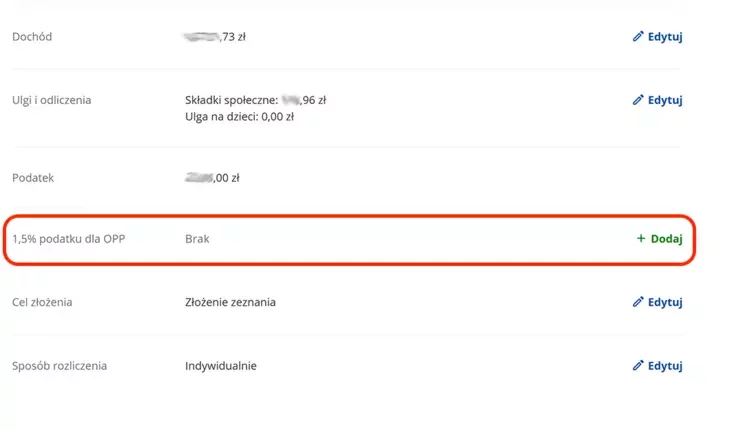
When filling out the declaration, the main thing is not to miss the section "1.5% podatku dla OPP" (transfer of 1.5% of tax payable to a public organization).
In the field "numer KRS wybranej organizacji" (KRS number of the chosen organization), enter the number 0000507234 – it corresponds to the Polish partner fund FaniMani, which helps "Nasha Niva" collect a percentage of the tax.
Next, in the field "Cel szczegółowy do przekazania 1.5% podatku" (Specific purpose for transferring 1.5% of tax), you need to enter the numbers 82197 – this is our unique organization number in the FaniMani system.
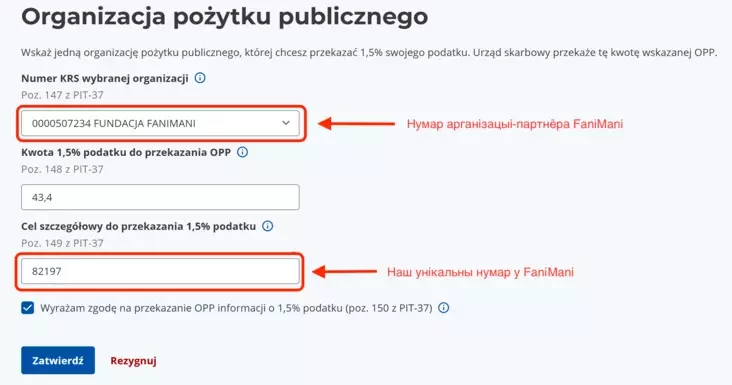
You need to be extremely careful here, because if you don't enter these numbers, the FaniMani system will not know which organization you transferred the money to.
Then check the box "Wyrażam zgodę" (I agree) and click the button "Zatwierdź" (Approve). Then continue filling out the declaration and send it at the end, when everything is ready.
Lithuania
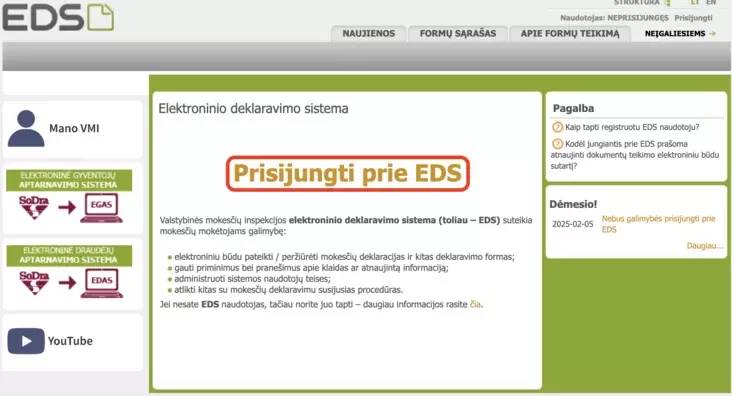
To file the mandatory tax declaration in Lithuania, you need to log in to the electronic tax declaration system EDS, and click on "Prisijungti prie EDS" there.
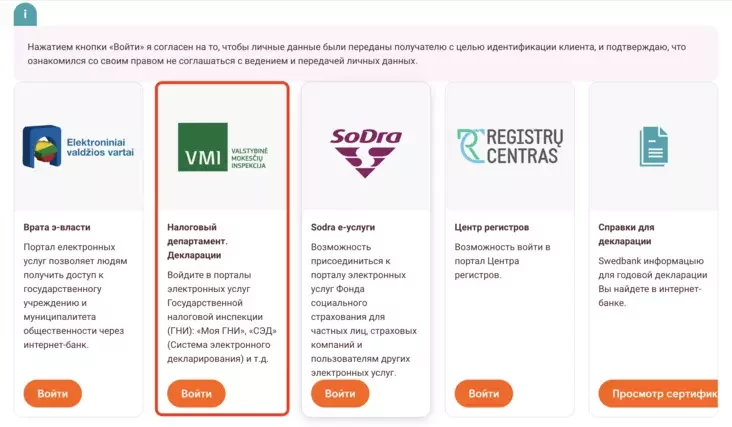
Next, you need to choose the system through which you will authorize into the EDS system.
In our example, this will be done via Swedbank, where you can select the Russian language for the interface.

After authorizing in E-services, you need to select the VMI section and click "log in".
After this, you will enter the EDS portal, where the declaration filling will take place.
To proceed with filling it out, you need to click on the globe icon.

This page is only available in Lithuanian, but further on, the interface language can be changed to Russian.
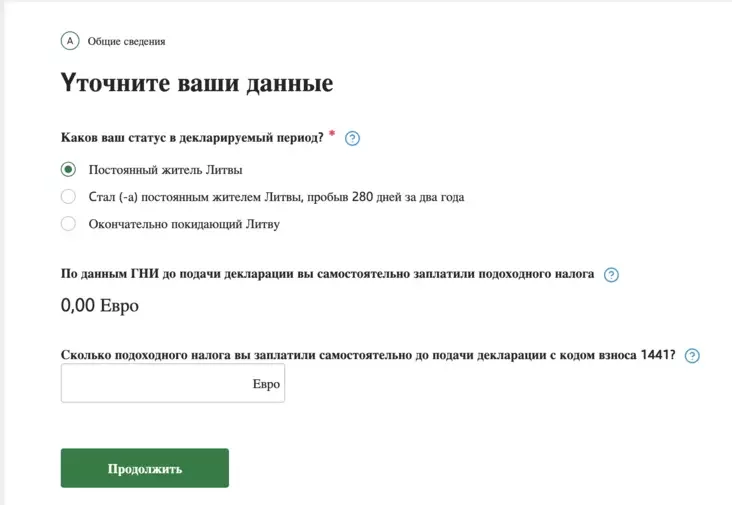
If you already have a Lithuanian residence permit from 2025 or earlier and work for a Lithuanian company, then for tax purposes, you are considered a permanent resident in any case.
Next, you fill out the declaration by answering the questions in the text.
After you answer all questions, the system will offer you to generate and submit the declaration, after which you will see the amount that the state owes you, or the amount you need to pay extra.
"I want to support!"
Below there will be a line stating that you have the opportunity to allocate a part of the income tax.
There you need to click on "Я хочу поддержать" (I want to support).

Further on, the interface will only be in Lithuanian, but it won't be difficult to figure out. To continue filling, you need to click on the globe icon again on the EDS page.
(Important, if you suddenly couldn't proceed by clicking on "Я хочу поддержать", then go to this link and continue submitting).

In the next step, click "Pradėti" (Start).

In the search bar, you need to enter the code of the organization you wish to support by transferring 1.2% of the already paid income tax.
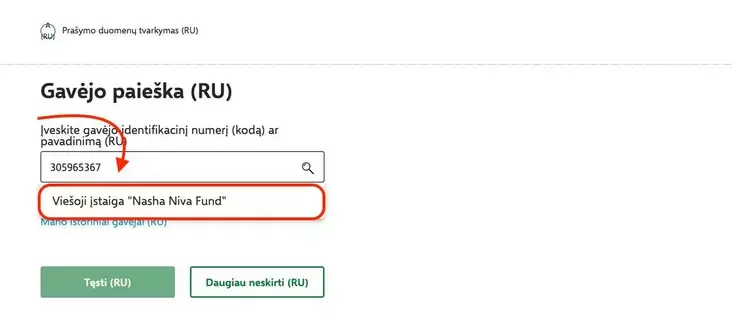
The number for "Nasha Niva" is 305965367. After entering our organization's code, the name of our legal entity in Lithuania will appear – Viešoji įstaiga «Nasha Niva Fund».
After selecting "Nasha Niva" (Viešoji įstaiga «Nasha Niva Fund») from the list, click on "Tęsti" (Continue).
In the next step, in the line "Mokesčio dalies dydis (procentais)" (Tax portion size (in percent)), you enter the numbers 1.2.

Then click on "Išsaugoti" (Save).
After that, you need to confirm your choice again and click on "Taip, teisingi" (Yes, correct).

Next, you will be asked if you want to send the request, to which you click on "Formuoti prašymą" (Submit request).

At the final stage, you will need to click on "Pateikti" (Submit) twice more. First in the bottom left corner, and then in the pop-up window.

In such a simple and completely free way for you, you can support "Nasha Niva" – a bastion of Belarusian identity and a source of information for all our people, both here and there.
-
The 400,000th article published on Nasha Niva's website. And what were the 300,000th, 200,000th, 100,000th about?
-
We told you: "Don't think this is small change"! Data revealed on how much income tax Belarusians in Lithuania transferred to various public structures
-
A reply to a reader from Tomsk about why your "brilliant director" is unacceptable to us


Comments